 Maxime CASIER
 How to borrow a SOLIDWORKS licence
Learn how to borrow and return a SOLIDWORKS licence using the Solidnetwork License Manager Client, with practical tips to avoid common mistakes.
Maxime CASIER 
What do the 2 options do and where are they found?
The options are accessible from Tools > Options > Backup / Recovery
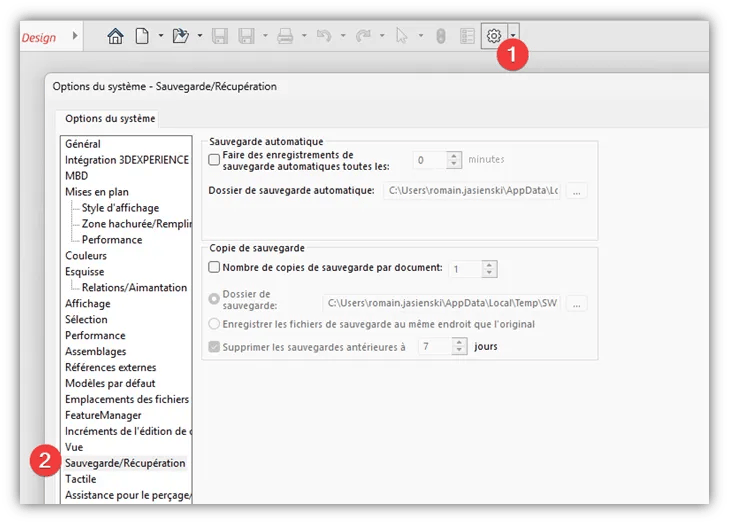
Auto-recover (Automatic save)
This option creates a save every X minutes automatically. If SOLIDWORKS crashes, the work that was in progress can be recovered on the next launch. Note that if heavy files are open, SOLIDWORKS will freeze for a period of time in order to perform this temporary save.
Warning: This does not replace a manual save under any circumstances — it is merely a possible safety net.
Backup copy
This option creates a copy of files at the time of saving (on a server, for example) directly in a defined folder.
It is recommended in order to keep a duplicate of files, and is useful for example in the case of a corrupted file where you wish to replace it with a working version.
NOTE
For both options, it is recommended to define a local storage location.
Maxime CASIER Maxime CASIER Maxime CASIER