 Maxime CASIER
 The Cloud Eligibility tool on the 3DEXPERIENCE platform

Purpose of the tool
The main purpose of the Cloud Eligibility tool is to perform a series of automated checks to ensure that your workstation is ready to run the 3DEXPERIENCE platform on the Cloud.
How to use
The tool runs on Windows and requires Internet access to provide relevant results.
Download and run :
You need to download the latest version of the Cloud Eligibility tool from the Dassault Systèmes support site.
Run the downloaded file (often CloudEligibility.exe).
The tool then proceeds to check your system, which usually takes less than 30 seconds.
Results display :
Once complete, the results are displayed in your web browser as an HTML report. An HTML copy can also be downloaded locally.
Report analysis :
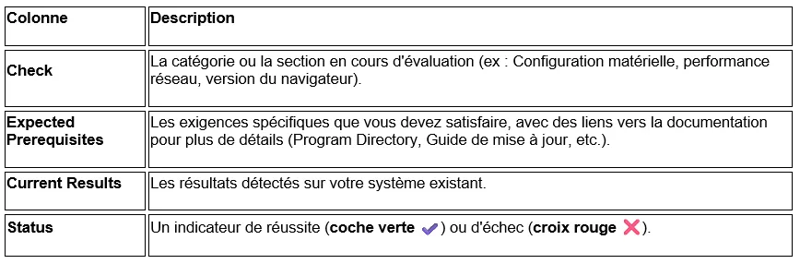
The report is generally presented with four main columns:
Interpretation and corrective action
To be considered Cloud-ready, you must ensure that the Status is a green check mark for all mandatory checks.
If a red cross ❌ appears, this means that a prerequisite has not been met.
The simplest step to correct a failure is to consult the related information in the column
Expected Prerequisites column to understand what needs to be updated or modified (hardware, software, network configuration, etc.).
The tool is based on official Dassault Systèmes documentation references (hardware and software, Program Directory for prerequisites, and official Cloud upgrade guide).