Can't create a sketched bend below 90° in SOLIDWORKS? Learn how to fix the bend origin measurement and bent sheet metal position options to resolve the issue.
Problem description
When using the "Sketched Bend" function, if a bend angle value of less than 90° is entered, a tooltip appears indicating that the angle value must be between 90° and 180°.
Fix
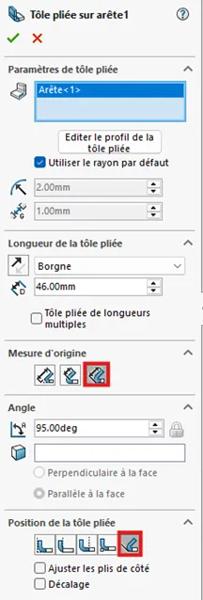
This behaviour is linked to two bend definition options:
The first is the sheet metal length dimension: if the length is dimensioned in the "Bend Position"
field as "Tangent to Bend", a bend of less than 90° will not be achievable.
The second is the "Bent sheet metal position": if this is set to "Tangent to Bend", a bend of less than 90° will not be achievable.
Simply choose a bend origin measurement type and a bent sheet metal position that is not based on tangency in order to create a sketched bend with a value below 90°.


 Maxime CASIER