 Maxime CASIER
 How do I activate or deactivate a SOLIDWORKS license?
Find out how to activate or deactivate a SOLIDWORKS license.
Maxime CASIER 
You can insert and display thread representations in assembly drawings when creating the view.
(This enhancement was first included in SOLIDWORKS 2024 SP2 but was not fully documented at that stage. We are including it here to make customers aware of this enhancement).
Benefits : you have more control over inserting and viewing thread representations in assembly drawings.
Previously, when you inserted thread representations in an assembly, you didn't automatically see the thread representations in the drawings. You had to click on Insert > Model objects > Thread representation to see the thread representations.
To insert thread representations in assembly drawings :
Click on Tools > Options > Document properties > Wrapping
Under Insert automatically on view creation, select Thread representations - assembly (may affect performance), then click OK
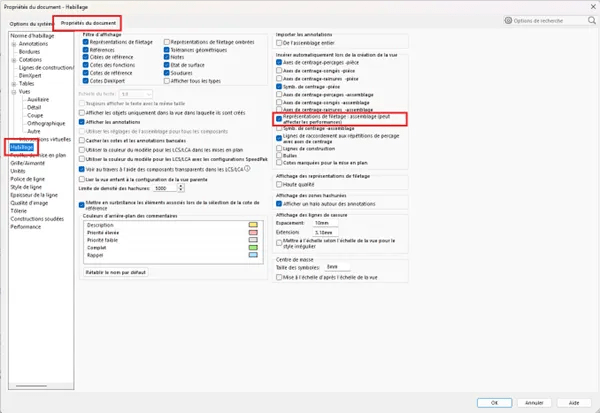
To import thread representations into assembly drawings :
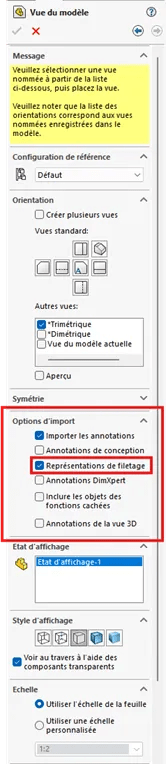
In the "Drawing view" PropertyManager, under "Import options", select "Import annotations" and "Thread representation".
Click on "Validate".
 Maxime CASIER Maxime CASIER Maxime CASIER