 Maxime CASIER
 Using SOLIDWORKS Composer: 10 must-have features
To get you off to a good start with SOLIDWORKS Composer, here are 10 essential features to help you create and manage technical communication for your SOLIDWORKS 3D CAD projects.
 Roman Fradin
From the Certification Center, click the "Your Credits" tab, then "Subscription Offer," and finally "Lookup my Licenses."
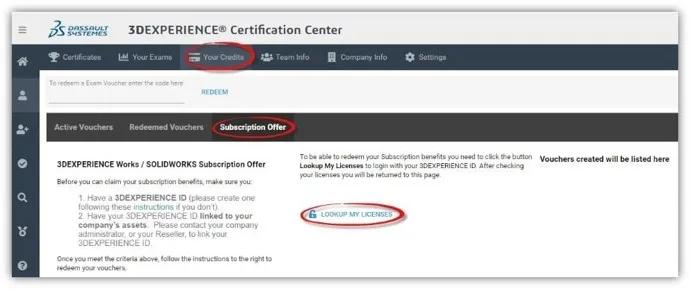
Sign in using your 3DEXPERIENCE ID when prompted. You will then be redirected to the Certification Center.
• Note: Your 3DEXPERIENCE Certification Account and your 3DEXPERIENCE ID do not need to have the same email address. The two systems are separate.
After clicking “Lookup My Licenses,” you’ll be able to select the exams for which you want to generate vouchers. Only the CSWA and CSWP exams are available with an active SolidWorks maintenance subscription. CSWE exams, on the other hand, require a fee.
Once the vouchers are generated, they appear in the “Subscription Offer” tab of the Certification Center.
To take the exams, you must install the TANGIX Tester Pro client, which can be downloaded from the Certification Center homepage.
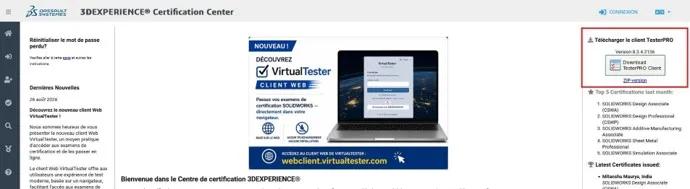
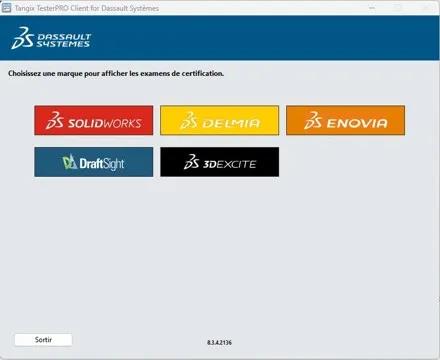
Once the installation is complete, launch the software. The login ID and password are the same as those for the Certification Center.
Next, select the environment.
Vouchers must be entered in the “Event ID / Voucher” field.
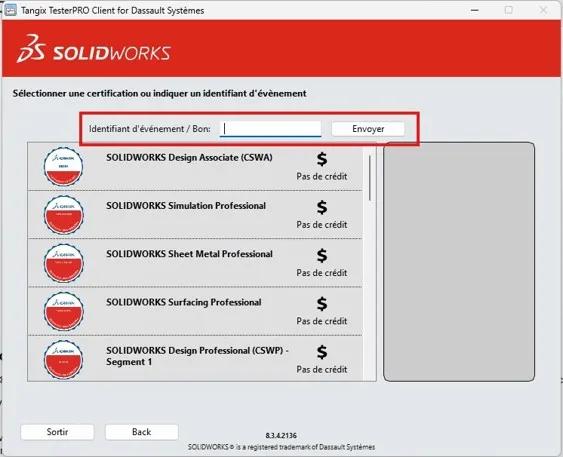
Additional Information: An active maintenance contract on the company’s account is required to receive the vouchers
Every semester, you are entitled to 3 free tokens available on your company’s account (from January 1 through June 30 and from July 1 through December 31—with a reset each semester). These tokens can be used toward a selection of certifications (excluding Expert certifications).
Maxime CASIER Maxime CASIER Maxime CASIER