 Maxime CASIER
 Where can I find installation sources for SOLIDWORKS products?

Quelle: Dassault Systèmes
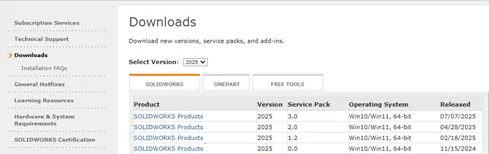
Źródło SolidWorks można znaleźć na stronie internetowej Dassault Systèmes:
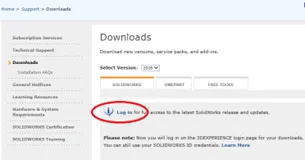
This site requires a login and password.
Źródło Visiativ
Deze oplossing biedt toegang tot de verschillende bronnen zonder dat een login en wachtwoord nodig zijn.
We raden deze oplossing aan, vooral bij de aankoop van de software.
- Open een webbrowser en typ de volgende URL in: ftp.visiativ-solutions.com
- Navigeer door de boomstructuur om toegang te krijgen tot de gewenste versie
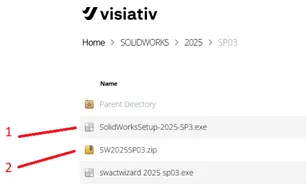
This small file provides the setup and launches the software installation. Missing files will be transparently downloaded by the setup from the Dassault website. This optimized download will depend on the modules in your license.
This file contains the entire software (DVD equivalent). After downloading, you will need to unzip the file to obtain the installation folder.
Źródło z oprogramowania
W SolidWorks można wysłać zapytanie do edytora, aby sprawdzić, czy dostępna jest nowa wersja.
-Wybierz "?", a następnie "Sprawdź dostępność.....".
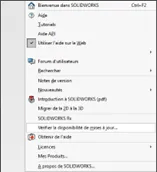
This feature will show you the available version. You will be able to choose the service pack.
Warning: If the line does not appear in the "?" menu, then you do not have administrator rights.
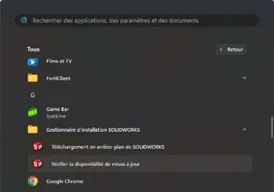
As in the previous case, you can choose the version and service pack.
If you are not the administrator of your workstation, run this feature as administrator.
Infolinia źródłowa
Możesz poprosić o link do pobrania od pomocy technicznej VISIATIV.
Pamiętaj, aby określić, czy chcesz pełną wersję, czy tylko konfigurację, zwłaszcza jeśli prędkość Internetu jest niska.
Dla informacji, konfiguracja pobiera tylko to, czego potrzebujesz.