 Maxime CASIER
 Top 5 new features in SOLIDWORKS 2025
Discover our trainer's 5 favorite features of SOLIDWORKS 2025
Maxime CASIER 
I. Preamble
1. What is a STEP file?
A STEP file is a 3D data exchange format used in CAD. It allows models to be transferred between different software applications, while preserving the geometry and 3D product information. It can be recognised by certain cutting or forming machines used in sheet metal work and engraving. It is referred to as a "neutral" file.
II. The 3DInterConnect option
2. What is the 3D Interconnect option for?
The 3D Interconnect option in SolidWorks is used to import CAD files (.STEP for example) while maintaining a dynamic link with the original file.
Import without heavy conversion:
The STEP file is read directly, without converting it into classic SolidWorks features.
Link with the source file:
If the original STEP file changes, it can update automatically in the assembly.
Less data loss:
Avoids certain geometry or simplification issues during import.
3. How to enable it in SolidWorks?
In the SolidWorks options, open the options menu: Tools > Options or via the following icon:
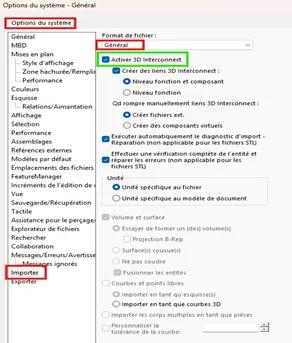
System Options > Import > General > Enable 3D Interconnect
III. Using a different STEP format: (AP-203/AP-214/AP-242)
The STEP AP203, AP214 and AP242 formats are variants of the STEP standard (ISO 10303). Each corresponds to an "Application Protocol" adapted to different needs.
1. AP203 – The most basic
Purpose: Exchange of 3D geometry and assembly structure. No colours or advanced metadata. Typical use: Simple mechanical CAD, without product data management (PDM/PLM).
2. AP214 – Richer
Improvements over AP203:
Colours, layers, geometric tolerances.
Product properties (material, part number, etc.).
Typical use: Exchange between CAD systems with slightly more advanced needs.
3. AP242 – The most complete and modern (Not generally available via SolidWorks)
Very complex geometries.
Metadata such as file properties, etc.
PMI (Product Manufacturing Information).
Semantic data for digital manufacturing.
Typical use: Complete 3D model for integration into a PLM chain, or for "Model-Based Definition" (MBD) approaches.
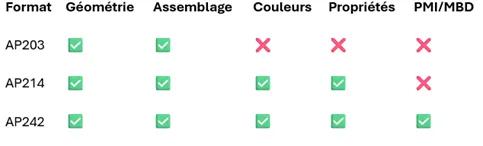
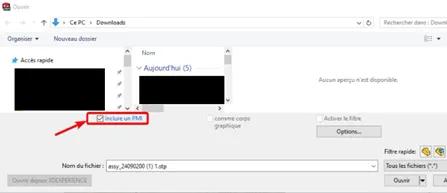
Attention : Les fichiers STEP au format AP-242 sont exploitables uniquement avec une licence MBD, afin d'obtenir l'option correspondante (encadrée en rouge) lors de l'import d'un tel type de fichier.
 Maxime CASIER Maxime CASIER
  Florian MARCHAND