 Roman Fradin
 Add a floating licence to SOLIDNETWORK Licence Manager

Adding the licence
Since the release of SOLIDWORKS 2023, the method for installing new floating licences has changed.
Previously, the serial numbers for your floating licences were entered during the installation of the SOLIDNETWORK LICENCE MANAGER server.
If you had an existing licence server, the solution was to modify that server's installation and add the new floating licence serial number.
From now on, you can use the Product Activation wizard from the SOLIDNETWORK Licence Manager server to add and activate serial numbers.
Here is how to proceed:
Open the SOLIDNETWORK LICENCE MANAGER SERVER.
In the Administration tab, click Modify (Licence information).
Once the activation window is open, confirm the server information (server address and firewall) and click
Next.
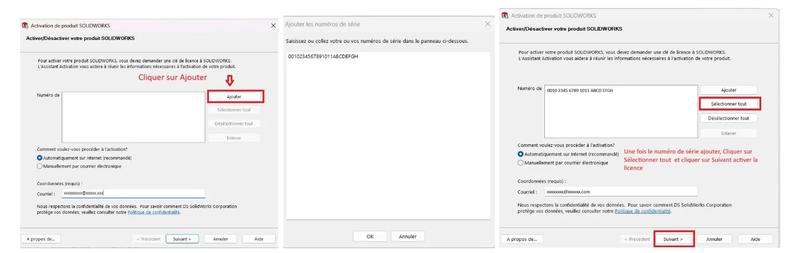
The next step involves adding the serial number as shown in the images below.
The procedure uses the dummy licence 0010 2345 6789 1011 ABCD EFGH
This new method makes it easier to add serial numbers to existing installations.
You can also use the activation wizard to remove expired serial numbers or those that have not been activated.
Select the SOLIDWORKS serial number and click Remove.