 Florian MARCHAND
 Activate / deactivate myCADtools license
Find out how to activate or deactivate your myCADtools license, the task automation tools in SOLIDWORKS?
 Philippe ROSSIGNOL
In most companies, IT security policies are becoming increasingly strict. Until now, every myCADtools update required IT department involvement. With version 2026 SP0, that barrier is gone: your users can now update myCADtools completely autonomously, without involving IT, while still complying with your company's security policies.
With admin rights required for every update, the process looked like this: the user reports the need, IT schedules the intervention, the update is installed, eventually. Between the moment a new version became available and the moment it reached users' workstations, days or even weeks could pass.
The result: inconsistent versions across workstations, unpatched bugs, inaccessible features for some users, and an unnecessary burden on the IT department.
With myCADtools 2026 SP0, that cycle ends.
An update pop-up directly in myCADtools. As soon as a new version is available, an update pop-up appears directly in the myCADtools interface. The user can launch the update immediately no admin rights needed, no IT ticket, no waiting. myCADtools updates automatically to the target version, transparently and without disruption.
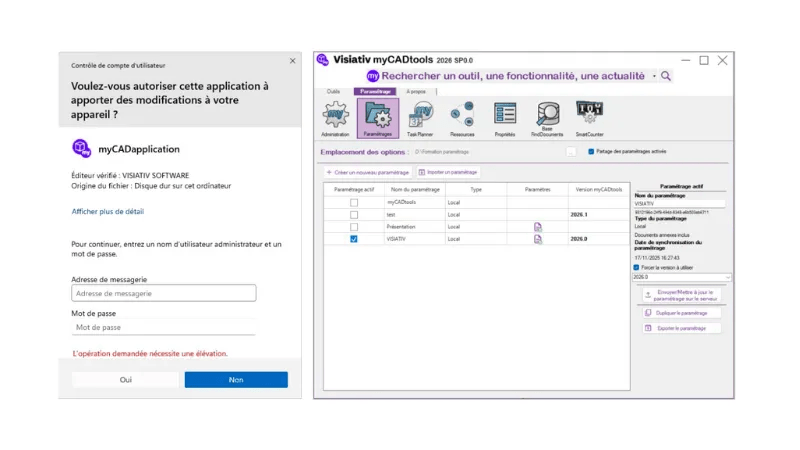
All available versions are listed in the interface. Users can switch between versions at any time to roll back if needed or to test a specific release.
In multi-user environments, keeping version consistency is often a significant challenge. From the myCADtools shared configuration, an administrator can now enforce a specific version that will be automatically deployed to all workstations using that configuration.
All users move to the same version simultaneously, with no workstation-by-workstation intervention required. Fleet maintenance is simplified, and support is easier to manage.
Less dependency on IT for routine updates
Faster access to bug fixes and new features
Version consistency across the entire workstation fleet
Simplified maintenance through centralized deployment
Full compliance with company security policies
This evolution is consistent with the broader philosophy of myCADtools: removing unnecessary friction so your teams can focus on their core work. Managing software updates should not require IT resources for every new version. From now on, it no longer does.
Florian MARCHAND Philippe ROSSIGNOL